
Emergency: Severe Weather App
American Red CrossWeather
4.51.31K Reviews
- Version
- 5.4.0
- Installs
- 500.00K
- Age Rating
- Everyone
Screenshots
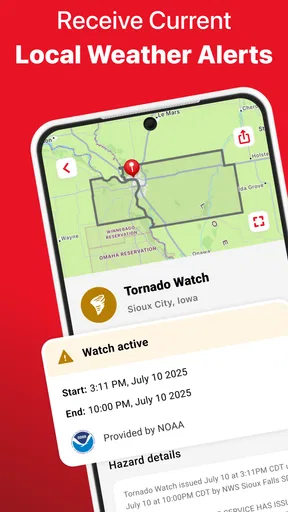
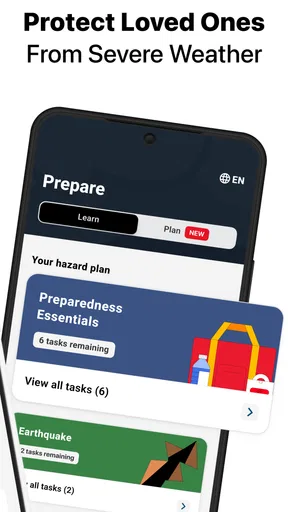
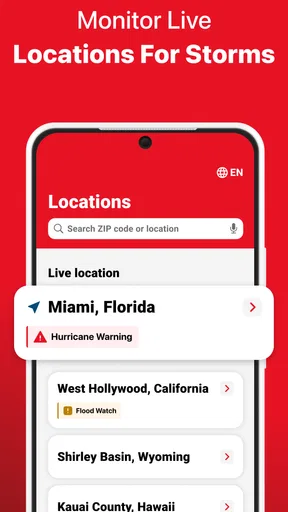
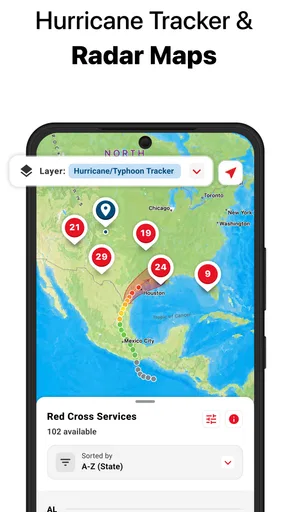
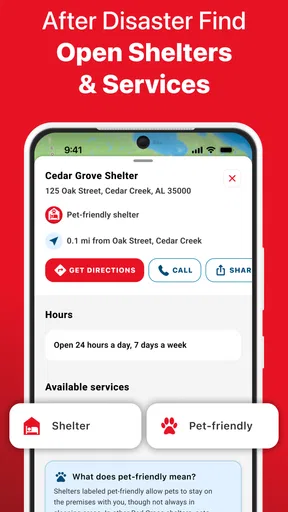
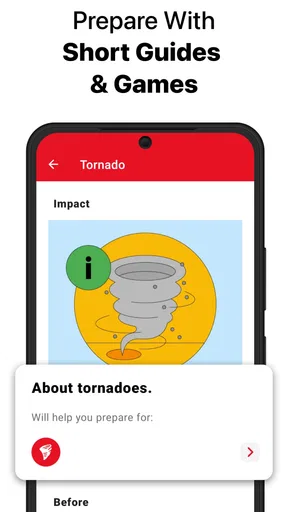
Our Review of Emergency: Severe Weather App
 Analysis by Appyee
When severe weather changes from something I am watching to something I need to act on, ordinary weather apps can feel too broad. They may show temperature, radar, and a forecast, but they do not always help me think through the practical question: what should I do if a tornado, hurricane, or earthquake affects my area? Emergency: Severe Weather App takes a narrower, more useful approach. It is a free weather and preparedness app from the American Red Cross, built around planning for serious events and receiving local weather alerts.
After spending time with it, I see the app less as a replacement for a full daily forecast and more as a preparedness companion. Its strongest value is the way it turns severe-weather awareness into something I can prepare for before an emergency begins. That distinction matters. If I only want tomorrow’s temperature, another weather app will probably be quicker. If I want a practical reminder that helps me prepare for a dangerous weather event, Emergency: Severe Weather App has a clearer purpose.
Why local alerts matter more than another ordinary forecast
The central capability is local weather alerting connected to emergency preparation. That sounds simple, but the effect is different from checking a general forecast. A normal forecast encourages me to look at the sky, decide whether to carry an umbrella, or adjust a commute. A severe-weather tool encourages a different kind of response: check the warning, think about where I would go, and make sure the people around me know what to do.
I find that distinction especially valuable because serious weather often creates a short window between awareness and action. A local alert can be the prompt that makes me stop what I am doing and move from passive monitoring to a prepared response. The app’s focus on tornadoes, hurricanes, and earthquakes also gives it a more serious tone than a typical weather dashboard. It is not trying to win my attention with endless forecast details; it is trying to make emergency planning easier to remember.
The app is categorized as weather, but I would describe it more precisely as a severe-weather preparedness tool. That description helps set the right expectation. It belongs on a phone used by someone who wants an additional layer of awareness, not necessarily as the only source of information during a crisis.
It is also worth understanding what an alert can and cannot do. An alert is a prompt, not a guarantee that every local situation will be understood perfectly from a phone screen. Conditions can change quickly, and official instructions remain more important than any single app. I treat the notification as a reason to pay attention and verify what is happening, rather than as permission to ignore emergency authorities or local guidance.
Turning a notification into a decision
The most useful mental habit I developed with the app was to connect an alert with a pre-decided action. For a tornado warning, that might mean knowing which interior room or lower-level area I would use. For a hurricane, it might mean checking supplies and thinking about whether travel or evacuation instructions could affect my plans. For an earthquake, it means remembering that preparation is not only about weather forecasts but also about what I will do during shaking and afterward.
This is where the app can have more practical value than a standard forecast application. A standard app may tell me that conditions are becoming dangerous. This one encourages me to ask what I will do next. That small change in framing is the most important feature in everyday use.
How it works in practice
In normal use, I would keep the app installed and treat it as a background preparedness tool rather than something I open every hour. The useful workflow is simple: set up the app for the location that matters to me, allow its local alert capability to do its job, and use quiet periods to think through the emergency information instead of waiting for a warning to appear.
That setup is worth doing carefully. If I am preparing for a home, I should use the home location. If I am responsible for children, older relatives, or someone with mobility needs, I should think about how an alert affects the entire household rather than only myself. Someone who travels frequently should remember that an app configured around one place may not be enough when visiting another region. The practical lesson is to review the location context whenever my routine changes.
I would also avoid treating notification setup as a one-time chore. Phones change, notification settings get altered, and people often silence apps without remembering it. Before a season when severe weather is more likely in my area, I would open the app, confirm that it is still configured as intended, and check that the phone itself is not blocking alerts. That is a small maintenance step, but it prevents a preparedness app from becoming decorative.
A realistic example is a family planning a weekend at home while storms are expected nearby. Instead of waiting for a dramatic warning, I would use the app as a prompt to review where everyone should gather, charge essential devices, and keep important items easy to reach. If a local alert arrives later, the family has already made the difficult decisions. The notification then confirms that it is time to act, rather than starting an argument about what to do.
That workflow reveals one of the app’s less obvious strengths: it can reduce decision-making under pressure. Emergency situations are stressful partly because people must make several choices quickly. Preparing those choices in advance is more valuable than simply collecting more forecast information. The app does not remove the need for judgment, but it can encourage the kind of preparation that makes judgment easier.
Using it alongside, not instead of, other sources
I would use this app beside a regular weather service and official emergency communication. A conventional weather app is usually better for hourly conditions, radar-style monitoring, travel planning, and everyday forecasts. Emergency: Severe Weather App is more focused on the moment when weather becomes a safety issue. The two roles complement each other rather than compete.
For example, I might use a familiar forecast app to decide whether an outdoor event is sensible, then rely on the American Red Cross app as an additional preparedness layer when severe conditions are possible. In a serious event, I would also follow local authorities and emergency services. That combination is stronger than expecting one application to provide every kind of information.
This is an important trade-off for people who prefer a single all-in-one app. The narrower focus makes the product easier to understand, but it also means that someone seeking sophisticated maps, long-range forecasting, detailed radar, or broad international coverage may prefer a different weather application. I would not install this expecting it to replace every tool on my phone.
The best scenario for this app
The strongest use case is a household that wants a simple preparedness reminder without building an elaborate emergency system. It is especially suitable for someone who has moved to an area where tornadoes or hurricanes are more common, a parent who wants emergency conversations to become routine, or a person responsible for checking on relatives during severe conditions.
I also think it is useful for people who are calm during ordinary weather but tend to freeze when warnings become serious. The app’s value is not only technical. It can serve as a repeated nudge to discuss emergency plans before they are needed. That is a practical benefit that is easy to overlook because it happens before the dramatic moment.
Consider a person who works from home. During an ordinary storm, they may keep working while glancing at a forecast. If a local alert arrives, the correct response may involve moving away from windows, checking on other people in the home, or pausing a meeting. Having already decided where to go and whom to contact makes the alert more useful. The app becomes part of a routine rather than a source of panic.
Another good scenario is a shared household with different levels of preparedness. One person may follow weather closely while another ignores it. A focused emergency app gives the more prepared person a concrete way to start a conversation: where are our supplies, which room do we use, and how will we communicate? It does not solve those questions automatically, but it helps keep them from being forgotten.
For travelers, the situation is more complicated. The app can still be worthwhile, but I would not assume that preparation for my home location automatically covers a hotel, campsite, or temporary workplace. Before traveling, I would check the local emergency guidance and think about the building’s procedures. The app is most effective when I actively adapt my plan to the place where I am.
A useful routine before an emergency
I would get the most from the app by pairing it with a short seasonal review. I would check alert settings, identify a safe place, make sure household members know the plan, and think about what changes if I am away from home. This takes the app beyond a notification screen and gives it a role in a repeatable routine.
One non-obvious advantage of this approach is that it exposes gaps that a forecast cannot show. A weather app may tell me conditions are worsening, but it will not make me notice that my household has no agreed meeting point or that one family member may need extra time to move. Using the alert as a planning trigger helps reveal those weaknesses while there is still time to address them.
Where the experience has limits
The focused design is also the main limitation. People who want a rich, constantly updated weather workspace may find the app too specialized. I would choose a conventional weather application for comparing forecast models, watching changing conditions during a trip, or checking detailed daily information. This app makes more sense when safety preparation is the priority.
I also would not rely on any phone-based alert system as my only warning method. Phones can be muted, disconnected, out of power, or out of reach. Buildings can interfere with attention, and people may miss a notification while sleeping or driving. An alerting app is an extra layer, not a substitute for local sirens, official instructions, a household plan, and common sense.
Another point of friction is that preparedness requires participation. Installing the app does not automatically make a home ready for a tornado, hurricane, or earthquake. I still need to read, discuss, and practice the relevant steps. Someone looking for a completely automatic safety solution may be disappointed because the most important benefits come from what I do with the information.
The app’s age rating of Everyone makes it approachable for a broad household audience, but that does not mean every child should be responsible for interpreting an alert alone. Adults still need to explain what a warning means and what action is expected. For younger users, the app can support a family plan, but it should not replace adult supervision.
Device compatibility is another practical consideration. The current version is 5.4.0, and it requires operating system version 10 or later. That is not a concern for many recent phones, but anyone using an older device should check compatibility before planning around the app. I would also keep the operating system and notification behavior in mind, because a safety tool is only useful when the phone can reliably display its alerts.
Finally, I would be cautious about confusing an alert with a precise personal instruction. A warning covering an area may affect one neighborhood more than another, and local conditions can change. I would read the message, compare it with official local guidance, and make decisions based on the actual situation. That extra judgment is not a flaw unique to this app; it is part of using alerts responsibly.
Who gains the most from installing it
The best audience is someone who wants a free, straightforward way to bring severe-weather preparation into everyday life. The app costs nothing, is intended for Everyone, and comes from the American Red Cross, which gives it a clear emergency-preparedness identity rather than the feel of a general-purpose forecast product.
Its reception suggests that many people find that focus useful: it holds an average rating of 4.5 from around 2.9 thousand ratings, with over 1.3 thousand written reviews and more than 500 thousand installs. Those figures do not prove that it will suit every person, but they do show that it has reached a meaningful audience of people interested in this kind of tool.
I would recommend it most strongly to new homeowners, families, caregivers, people living in regions exposed to severe storms, and anyone who admits they tend to postpone emergency planning. It is also a sensible addition for a person who already uses a daily weather app but wants a separate reminder focused on dangerous events.
I would suggest skipping it if the only thing you want is a polished forecast with detailed maps, extended planning, or minute-by-minute weather exploration. In that case, a dedicated forecasting app will likely be more satisfying. I would also skip relying on it alone if you are building a serious emergency communication plan; you need official local resources and backup methods as well.
My final view after using it
The real strength is not simply receiving an alert; it is being prompted to decide what that alert means before the emergency happens. That makes Emergency: Severe Weather App more useful than its short store summary might suggest. It connects local warning awareness with the human side of preparedness: knowing where to go, who to contact, and how to avoid making every decision under pressure.
It is not the broadest weather app, and I would not treat it as my only source during a crisis. Its value comes from a more focused role. Used beside a normal forecast service and official emergency guidance, it can give a household a practical way to prepare for tornadoes, hurricanes, and earthquakes without turning preparedness into a complicated project.
For me, that makes it an easy recommendation for people who want a free safety-focused addition to their phone. Install it, configure it thoughtfully, review the plan with the people who depend on you, and keep your expectations realistic. If you want everyday weather detail, look elsewhere; if you want local severe-weather alerts to become a trigger for better preparation, this app earns its place.
Verdict
Strengths of Emergency: Severe Weather App
- Provides timely alerts for severe weather in your selected areas.
- Offers radar and forecast tools to track storms more closely.
- Location-based notifications help keep warnings relevant to you.
- Useful safety information explains what to do during emergencies.
- Clean layout makes important weather details easy to find.
Limitations of Emergency: Severe Weather App
- Some advanced features may require a paid subscription.
- Alerts depend on internet access and enabled location permissions.
- Frequent notifications can become overwhelming during active storms.
- Radar coverage and accuracy may vary by region.
- Battery use can increase when background location tracking is enabled.
Other Releases by American Red Cross
View All
Blood Donor
Medical4.8
Similar Picks in This Category
View All
Weather - By Xiaomi
Xiaomi Inc.4.1

Weather & Radar Forecast
WetterOnline4.8

Weather
OneLouder Apps4.6

AccuWeather: Weather Radar
AccuWeather3.6

The Weather Channel - Radar
The Weather Channel4.6

1Weather Forecasts & Radar
OneLouder Apps4.3
Frequently Asked Questions
What is the Emergency: Severe Weather app used for?
Emergency: Severe Weather is designed to help users monitor dangerous weather conditions and receive important alerts. It can provide information about severe storms, tornadoes, hurricanes, floods, extreme temperatures, and other weather emergencies, depending on the supported location and services. It is useful for staying informed, but it should complement—not replace—official emergency instructions from local authorities.
Does the app provide real-time severe weather alerts?
The app may deliver weather warnings and emergency notifications in real time, but the speed and availability of alerts can depend on your location, internet connection, device settings, and the data supplied by official weather agencies. Before relying on it, enable notifications, allow location access if requested, and check that battery-saving settings are not preventing the app from running properly in the background.
Does Emergency: Severe Weather require location access?
Location access may be needed to identify your current area and show relevant warnings. Some features may also allow you to manually select cities or regions instead of sharing your precise location. If you deny location permission, the app may still work with manually entered locations, but automatic local alerts could be limited. Review the permission options carefully during setup.
Can I use the app without an internet connection?
Most severe weather information and alert services require an internet or mobile data connection because the app must receive updated information from weather and emergency sources. Previously loaded details may remain visible for a short time, but they should not be considered current during an emergency. Keep an alternative source available, such as local radio, television, or official government alerts.
Is Emergency: Severe Weather a replacement for official emergency services?
No. The app is an information and notification tool, not a substitute for emergency services, evacuation orders, weather radios, or instructions from local authorities. Alerts can be delayed, unavailable, or affected by technical problems and network coverage. If a warning advises evacuation or immediate action, follow official guidance first and contact emergency services when necessary.
